





How to Check QID Status Online in Qatar (Step-by-Step Guide 2026)
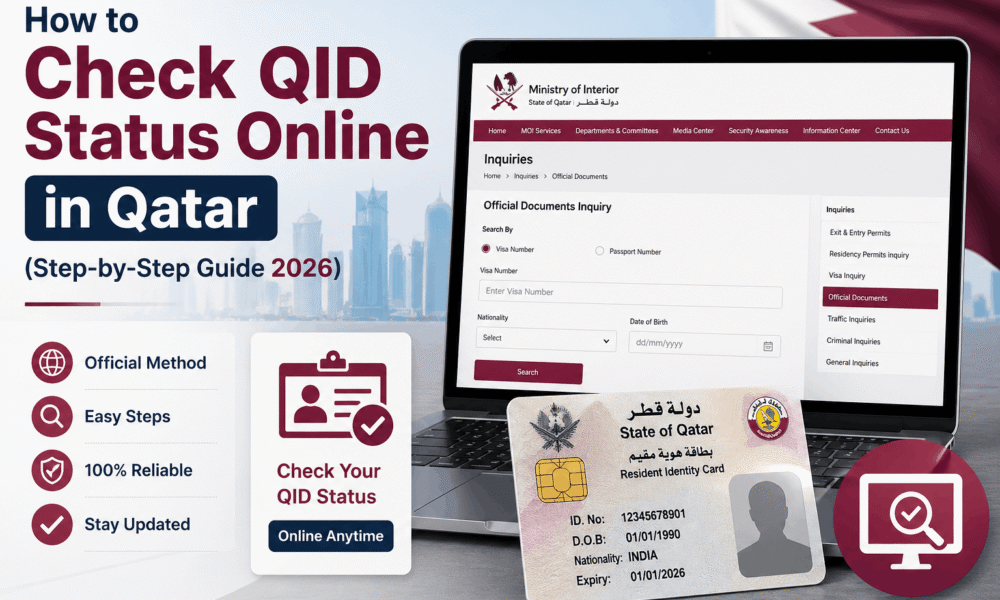
If you are living in Qatar or planning to move soon, then one of the most important documents you need is the Qatar ID (QID). Your QID is required for almost everything, including opening a bank account, getting a SIM card, signing a rental contract, and accessing government services.
However, many people face confusion after applying for QID because they don’t know how to track their application status. Therefore, in this guide, we will explain How to Check QID Status Online in Qatar using official methods like the MOI Qatar website and the Metrash2 mobile application.
Moreover, we will also cover how to do a Qatar ID status check by passport number, and what to do if your QID status is not showing.
What is Qatar ID (QID) and Why is it Important?
The Qatar ID commonly known as QID is an official identity card issued by the Qatar government. It contains important details such as your name, nationality, ID number, and residency status.
In fact your QID is required for:
- Getting a residence permit (RP)
- Employment verification
- Driving license application
- Health card registration
- Banking and salary transfer
- Metrash2 services
Because of this, it is very important to check your QID progress regularly especially after medical tests and fingerprint appointments.
How to Check QID Status Online in Qatar (MOI Official Method)
The best and most trusted way to check your Qatar ID status is through the official Ministry of Interior (MOI) Qatar website. This is the most accurate method because it directly shows your residency application record.
Follow these steps carefully:
Step 1: Visit MOI Qatar Official Website
Below, I have provided the direct link to the official MOI Inquiries website. You can click on it to go directly to the official MOI website.
Step 2: Open the “Inquiries” Section
On the MOI homepage, click on “Inquiries”.

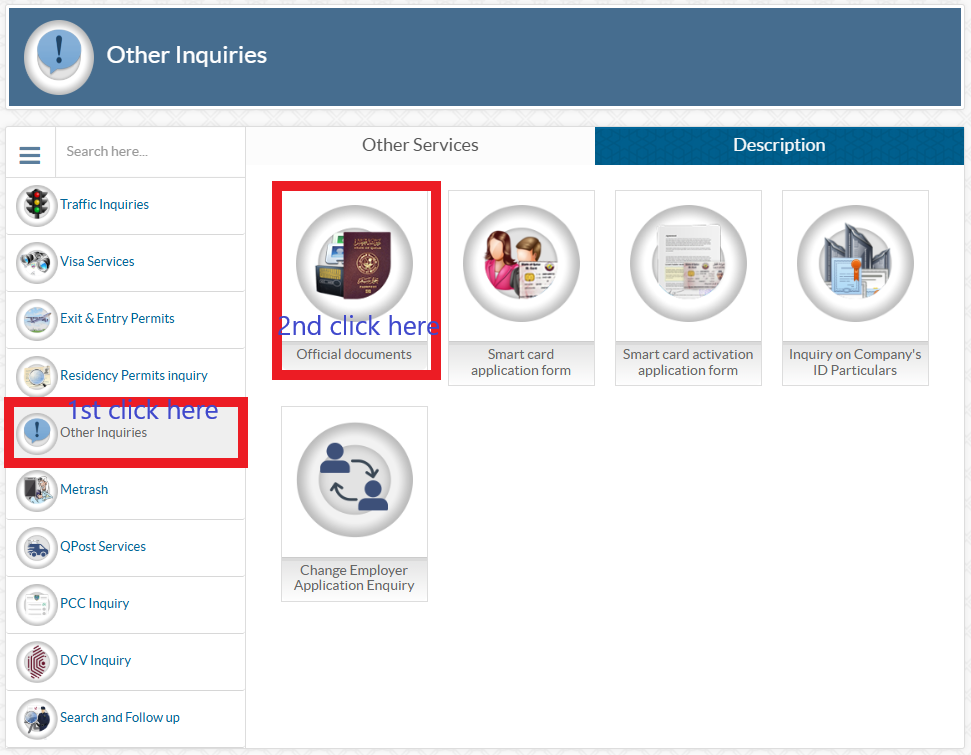
Step 3: Select “Other Inquiries”
Now select the option called “Other Inquiries”.
Step 4: Choose “Official Documents”
After that click on “Official Documents”.
Step 5: Enter Your Details
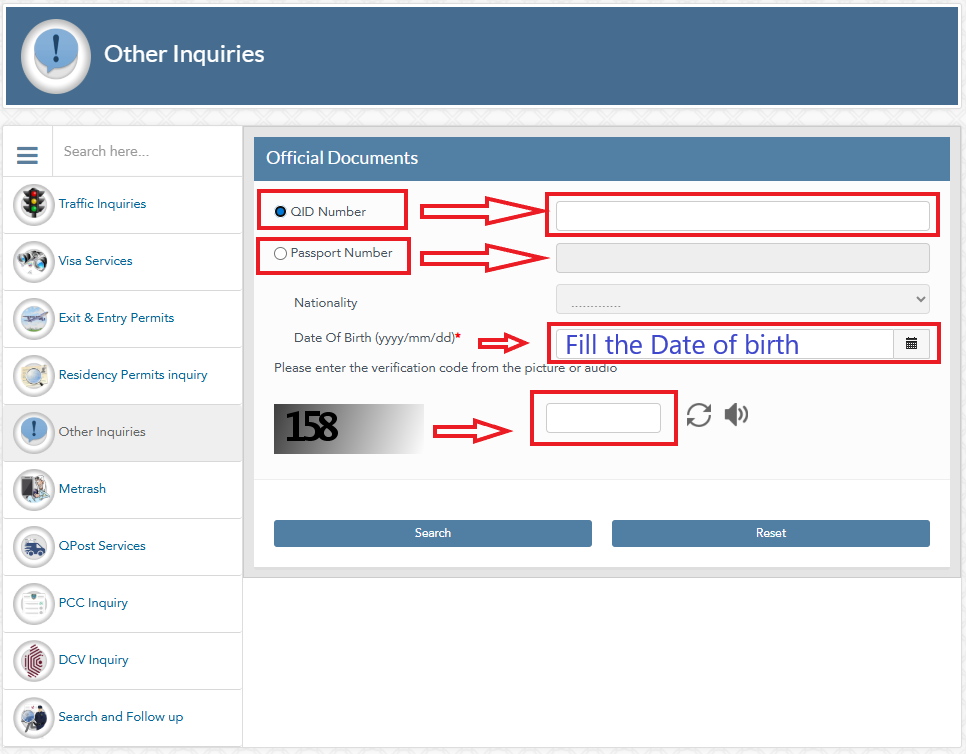
You will see a form. Here you need to enter:
- QID Number OR
- Passport Number
- Select your nationality
- Fill the Date of birth
- Enter the verification code from the picture in captcha box
Step 6: Click Search
Finally, click on Search.
Within seconds, you will see your QID status.
This method is widely used for QID status check Qatar online, and it works smoothly in most cases.
Qatar ID Status Check by Passport Number (Easy Method)
Many expats in Qatar do not have their visa number, but they always have their passport. Luckily MOI allows you to check your QID status using passport details.
Steps to Check Qatar ID Status by Passport Number
- Open MOI Qatar portal
- Go to Inquiries
- Choose Official Documents
- Enter your passport number
- Select nationality
- Fill the Date of birth
- Enter the verification code from the picture in captcha box
- Click Search
As a result you will be able to see whether your QID has been issued under process, pending.
This is one of the most searched queries online: “Qatar ID status check by passport number”.
How to Check QID Status in Qatar Using Metrash2 App
Another official and fast method is using the Metrash2 app, which is available for Android and iPhone. This app is widely used in Qatar for residency, traffic, visa, and ID-related services.
Step-by-Step: QID Application Status Check on Metrash2
Step 1: Download Metrash2
Download it from:
- Google Play Store
- Apple App Store
Step 2: Login to Your Account
Login using your QID number (if available) or sponsor details.
Step 3: Go to Residency Services
After login, go to the Residency section.
Step 4: Select “Residency Inquiries”
Here you can check your QID processing updates.
Metrash2 is very useful for Qatar ID tracking online, especially if you want to monitor your residency process frequently.
How to Track QID Application Status in Qatar (Complete Process)
If you recently applied for a Qatar ID, your process normally goes through these stages:
Common QID Status Stages
- Under Process
- Medical Completed
- Fingerprint Pending
- Fingerprint Completed
- RP Approved
- QID Printed
- QID Ready for Collection
Therefore, if you are checking your QID status online in Qatar, you may see one of these updates.
What to Do If QID Status Is Not Showing?
Sometimes, people face issues while checking their status online. However, there is no need to panic.
Here are the most common reasons:
Reasons QID Status Not Appearing
- Medical test not updated yet
- Fingerprint appointment not completed
- Visa not linked properly
- Sponsor has not submitted documents
- MOI portal temporary issue
Solution
Try again after 24–48 hours. Also, ensure that your passport number and nationality are correct.
Additionally, you can ask your sponsor or HR department to verify your residency file.
Benefits of Checking QID Status Online in Qatar
There are many benefits of tracking your QID status online.
For example:
- You avoid unnecessary visits to government offices
- You can plan bank and SIM registration
- You can follow residency progress in real time
- You can confirm whether your QID is printed or not
That is why How to Check QID Status Online in Qatar is one of the most useful topics for expats.
Important Tips for Faster QID Processing
If you want your QID to be issued faster, then follow these tips:
- Complete medical test as soon as possible
- Do fingerprint appointment without delay
- Ensure sponsor submits documents on time
- Keep a copy of visa and passport
- Check MOI Qatar QID status regularly
Furthermore, always use official sources like MOI and Metrash2 for correct information.
FAQ Section (SEO Friendly FAQs)
| 1 | How to check QID status online in Qatar? | You can check QID status online in Qatar using the MOI Qatar website by entering your visa number or passport number under the “Official Documents” inquiry section. |
| 2 | Can I do Qatar ID status check by passport number? | Yes, MOI Qatar allows Qatar ID status check by passport number. You just need to enter your passport number and select nationality to see the QID status. |
| 3 | Which is the official website for MOI Qatar QID status? | The official website is: portal.moi.gov.qa. It is the most reliable source for QID status check Qatar online. |
| 4 | How long does it take to get QID after medical? | Normally, it takes 5 to 15 working days after medical and fingerprint completion. However, in some cases, it may take longer depending on approval process. |
| 5 | Can I track Qatar ID application status on Metrash2? | Yes, Metrash2 is an official government app. It helps you in Qatar ID tracking online and checking residency updates. |
Conclusion
Checking your QID status is now very easy because Qatar government provides official online services. Whether you use the MOI Qatar website or the Metrash2 app, you can quickly track your residency progress.
So, if you are waiting for your QID, follow this guide on How to Check QID Status Online in Qatar and keep checking your status regularly. In addition, always make sure your sponsor completes the required steps on time.
| Disclaimer |
|---|
| This article is only for informational purposes. Qatar government rules and procedures may change anytime. Always confirm the latest updates from the official MOI Qatar website or government sources. |
For more Qatar visa updates and helpful guides, visit GulfHelpDesk regularly. We share verified information and step by step Qatar solutions for expats. Stay updated and save time by exploring our latest Qatar articles on GulfHelpDesk.






No Comment! Be the first one.